Search This Blog

Sunday, 10 January 2016

How can cut & paste any folder or documents?

* How can cut & paste any folder or documents?
1.Select any folder or document.
2.Right click on your folder or document.
3.Choose cut option.
4.You can paste another place.


How can copy & paste any folder or documents?

* How can copy & paste any folder or documents?
1.Select any folder or document.
2.Right click on your folder or document.
3.Choose copy option.
4.You can paste another place.


Sunday, 29 March 2015

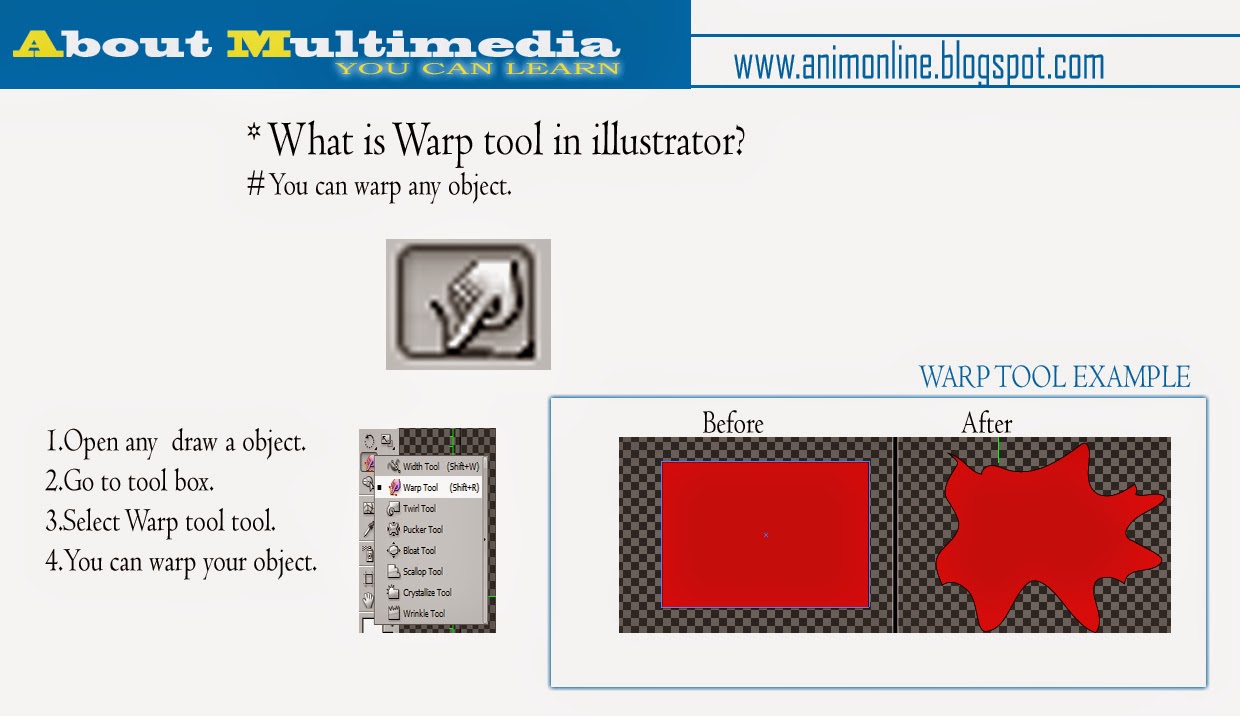
What is Warp tool in illustrator

* What is Warp tool in illustrator?
# You can warp any object.
1.Open any  draw a object.
2.Go to tool box.
3.Select Warp tool tool.
4.You can warp your object.

Sunday, 18 January 2015

What is Free transform tool in illustrator

* What is Free transform tool in illustrator?
# The free transform tool rotates, skew & select any object.
1.Open any symbol or draw a object.
2.Go to tool box.
3.Select free transform tool.
4.You can rotate your object or symbol.

Thursday, 15 January 2015

What is width tool in illustrator

* What is width tool in illustrator?
# Width tool allows you to create a stroke with variable width.
1.Draw a line.
2.Go to tool box.
3.Select width too.
4.click on the line &
   drag.


HINDI TUTORIALS

Monday, 12 January 2015

What is Scale tool in Illustrator

*What is Scale tool in Illustrator ?
#You can resize any object around a fix point.
1. Go to tool box & click scale tool.
2. Resize your object.


HINDI TUTORIALS

Sunday, 11 January 2015

What is Rotate tool in Illustrator


*What is Rotate tool in Illustrator?
#You can Rotate any objects, line, images, symbols, etc
1. Go to tool box & click rotate tool.
2. Set your anchor position & rotate your objects.
3. If you want to duplicate your object, press “ALT”
    button & rotate object.

Total Pageviews

Followers